01. Introduction to sos-vault
Introduction
sos-vault is a Linux sos-report management system and analysis tool designed to simplify, streamline, and enhance Linux system diagnostics. It provides a secure, user-friendly, and efficient platform for uploading, storing, unpacking, managing, and collaborating analysis for Linux sos-report files. sos-reports, typically used by system administrators and support teams, aggregate critical system logs, configuration files, and diagnostic data into a single package, which can then be analyzed for troubleshooting and support.
Is a powerful platform that aims to streamline troubleshooting workflows by offering automated diagnostics and seamless human collaboration, reducing the time and effort required for root cause analysis.
As a modern alternative to manual Linux manual troubleshooting tasks, sos-vault is built to help Linux administrators, support engineers, and DevOps teams quickly identify system issues, track trends, and share findings with their teams or vendors in a centralized environment.
The tool focuses on features such as:
- Secure Data Management
- Encryption and central storage of sos-reports in a private and per account secure vault. Encryption at rest: LUKS 2 with AES-256 in XTS mode.
- All sos-report uploads are tranfered encrypted. Encryption in transit: TLS v1.3.
- Accessibility is restricted to authorized users only, ensuring data protection.
- Supports uploading, storing, and indexing Linux sos-reports securely.
- Users can browse historical reports, compare past and present issues, and track system health over time.
- Multi-user access with role-based permissions for teams to collaborate safely sharing the same private vault for Teams/Enterprise plans.
- Streamlined Workflows
- Simplifying log analysis with intuitive tools and automation.
- Advanced Analysis Features
- File-level data examination, annotations, comparisons between reports, and historical performance tracking.
- Collaboration
- Sharing findings with team members and integrating results into help desk systems.
- Team members can annotate data points within the sos-report and share findings to foster collaboration.
- Integration with IT System Management like Jira Service Management, JIRA and in the future others.
Automated Analysis Tools
Graphical summaries for quick system diagnostics.
Advanced reporting and filtering capabilities.
Identify system issues, anomalies, and performance bottlenecks.
Extracts relevant information from logs, system configurations, and command outputs.
Helps identify possible causes and solutions based on known patterns and best practices.
Supports back-end automated analysis via an upload API.
How Does sos-vault Work?
sos-vault operates through a step-by-step workflow that incorporates modern tools for secure data handling and collaborative diagnostics:
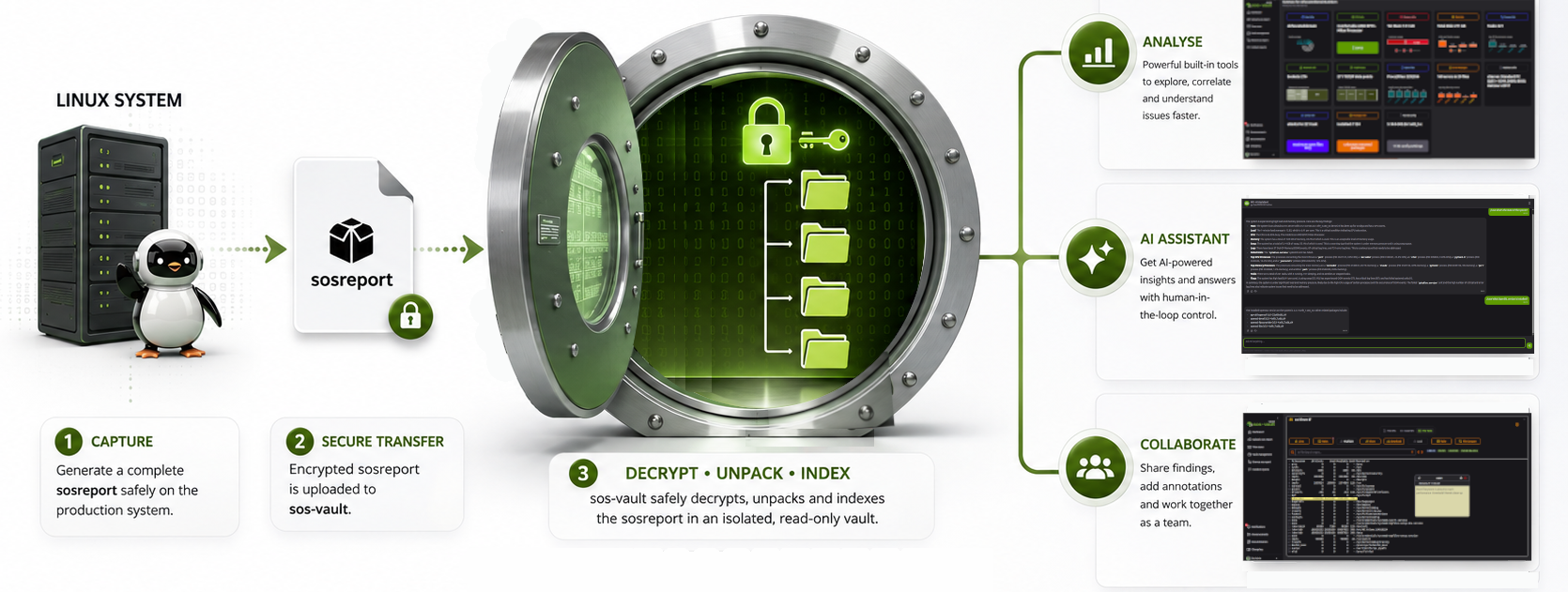
Step 1: Generate a sos-report
- A user generates an sos-report from their Linux machine using the `sos command with the report option`.
- This report collects system information, logs, configuration details, and other diagnostic data.
- The collected data is securely compressed and encrypted, preparing it for upload.
Step 2: Upload and Unpack the sos-report
- Users upload the sos-report file to the sos-vault platform (from their local system, from the command line or download it from an ITSM ticket).
- Once uploaded, the system decrypts and unpacks the report into folder structure so users can explore the data in an organized way.
Step 3: Analyze the Contents
- Explore Data: Users can examine the contents of the sos-report visually using the web browser.
- System Summaries: Provides visual system-level summaries such as CPU usage, memory allocation, process activity, and network activity.
- File Comparisons: Users can compare different sos-reports to identify changes or inconsistencies (work in progress).
- Annotations: Enables users to highlight, annotate critical findings, and leave comments for collaborative review.
Step 4: Apply Advanced Analysis Tools
- The platform offers diagnostic tools such as:
- Identifying log discrepancies or errors.
- Viewing historical system performance data (if sar is enabled in the system).
- Analyzing server configuration and inventory snapshots.
Step 5: Collaborate and Share Findings
Findings can be:
- Shared with team members for collective review.
- Integrated with Help Desk systems and IT System Management solutions (e.g., ticketing tools) for further analysis or reporting.
Conclusion
sos-vault is a cutting-edge platform that revolutionizes Linux sos-report management by combining secure storage, interactive support, and human escalation options. It empowers Linux support teams, enterprise IT departments, and DevOps professionals to troubleshoot faster, smarter, and more effectively, ultimately improving system reliability and uptime.
In essence, sos-vault acts as a comprehensive, secure diagnostic hub for Linux administrators, supporting them in efficiently managing, analyzing, and collaborating on sos-reports. Its workflow simplifies the traditionally manual process of unpacking and analyzing system logs by automating and centralizing these tasks in a user-friendly interface.